
Langdock is a good fit for companies that want a ChatGPT-style workspace with SSO, agents and workflows, without building it themselves. The catch is the model list. Out of the box you get the big closed labs. If your team wants DeepSeek for cheap long-context work, GLM or Kimi for coding, or an open-weight model because your data policy says weights must be inspectable, you have to bring it yourself.
Langdock lets you do that through an OpenAI Compatible key. Point that key at Requesty and every open-weight model in our catalog becomes available to your workspace: DeepSeek V4.1 Flash, GLM-5.3 and GLM-5.3 Flash, Kimi K3, Nemotron 3 Ultra, MiMo V2.5 and a few hundred more. One key, one base URL, one invoice. To pick one, see the best open-weight models for agents.
This post walks through the setup and then covers the questions that come up right after: which models to start with, how to keep traffic in the EU, and how to see who is spending what.
Why route through a gateway instead of a single provider
You could paste a DeepInfra, Fireworks or Novita key straight into Langdock. Three things push most teams to a gateway instead:
- Open-weight models are served by many providers, with very different prices and speeds. The same DeepSeek V4.1 Flash weights are hosted by seven providers in our catalog. Requesty picks the endpoint per request based on your routing policy (cheapest, fastest, EU-only) and fails over when one is down.
- Langdock needs one key per provider. Every provider you add is another credential to rotate and another vendor to onboard. A gateway collapses that to one.
- You want to see usage per user and per model. Langdock shows you chat history. Requesty shows you cost, tokens, latency and cache hit rate per model and per key, which is what finance asks for.
Step 1: create a Requesty API key
Sign in at app.requesty.ai, open API Keys, and create a key named Langdock. If you want to restrict which models this key can call, set up an approved-model list first. That is also how you enforce "open-weight only" or "EU-hosted only" at the gateway level rather than trusting each user to pick the right model.
Step 2: add the key in Langdock
In Langdock go to Settings > Models, scroll to Keys, and click Add key. Choose OpenAI Compatible and fill in:
- Key name:
Requesty - Base URL:
https://router.requesty.ai/v1, orhttps://router.eu.requesty.ai/v1for EU-only routing - API Key: the key from step 1
- Hosting Provider:
Requesty
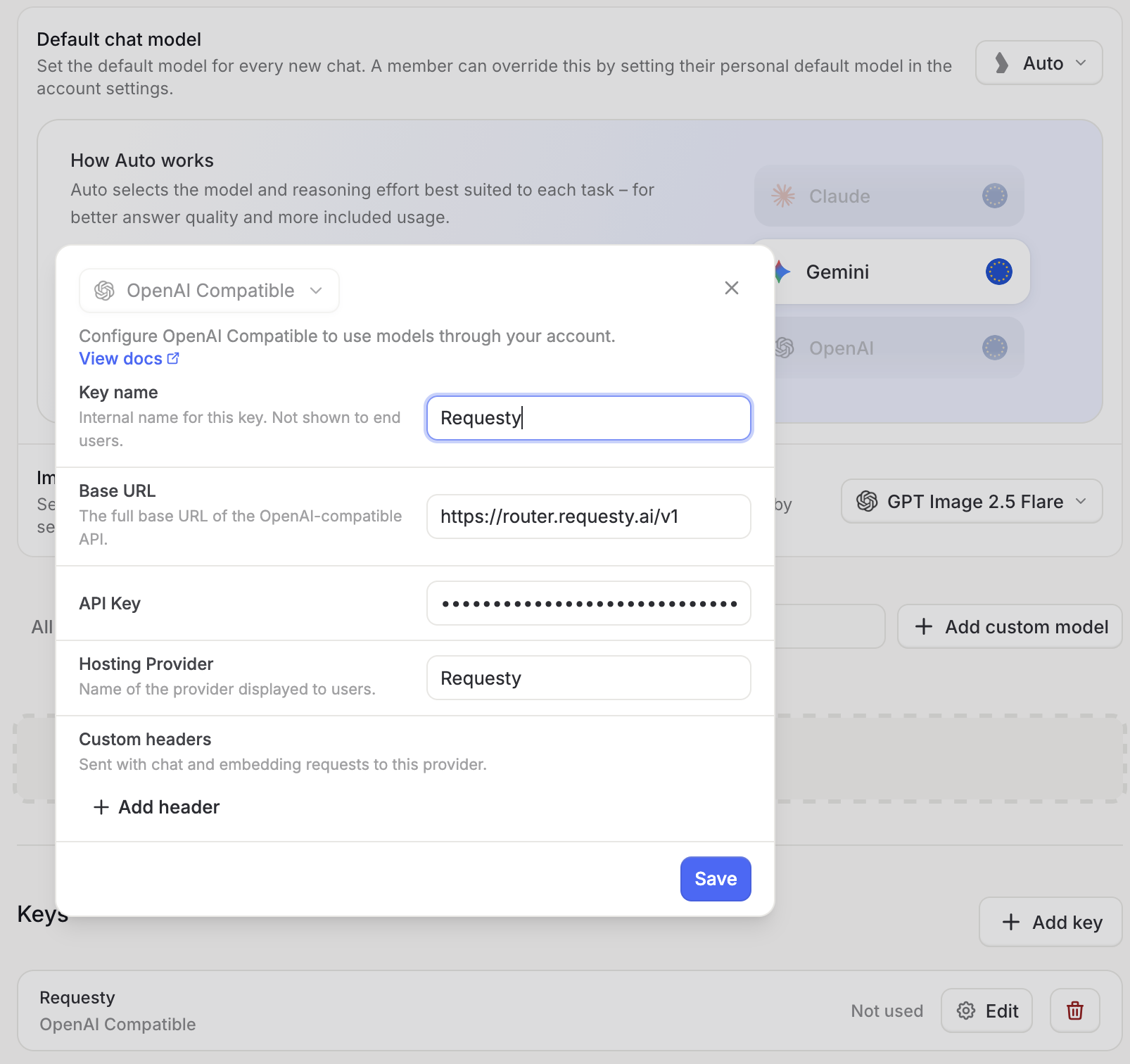
Save. The key shows as Not used until a model references it.
Step 3: add each open source model as a custom model
Langdock does not pull the model list from the provider, so each model is added by hand. Click Add custom model, ignore the pre-configured list, and click set up manually in the bottom right.
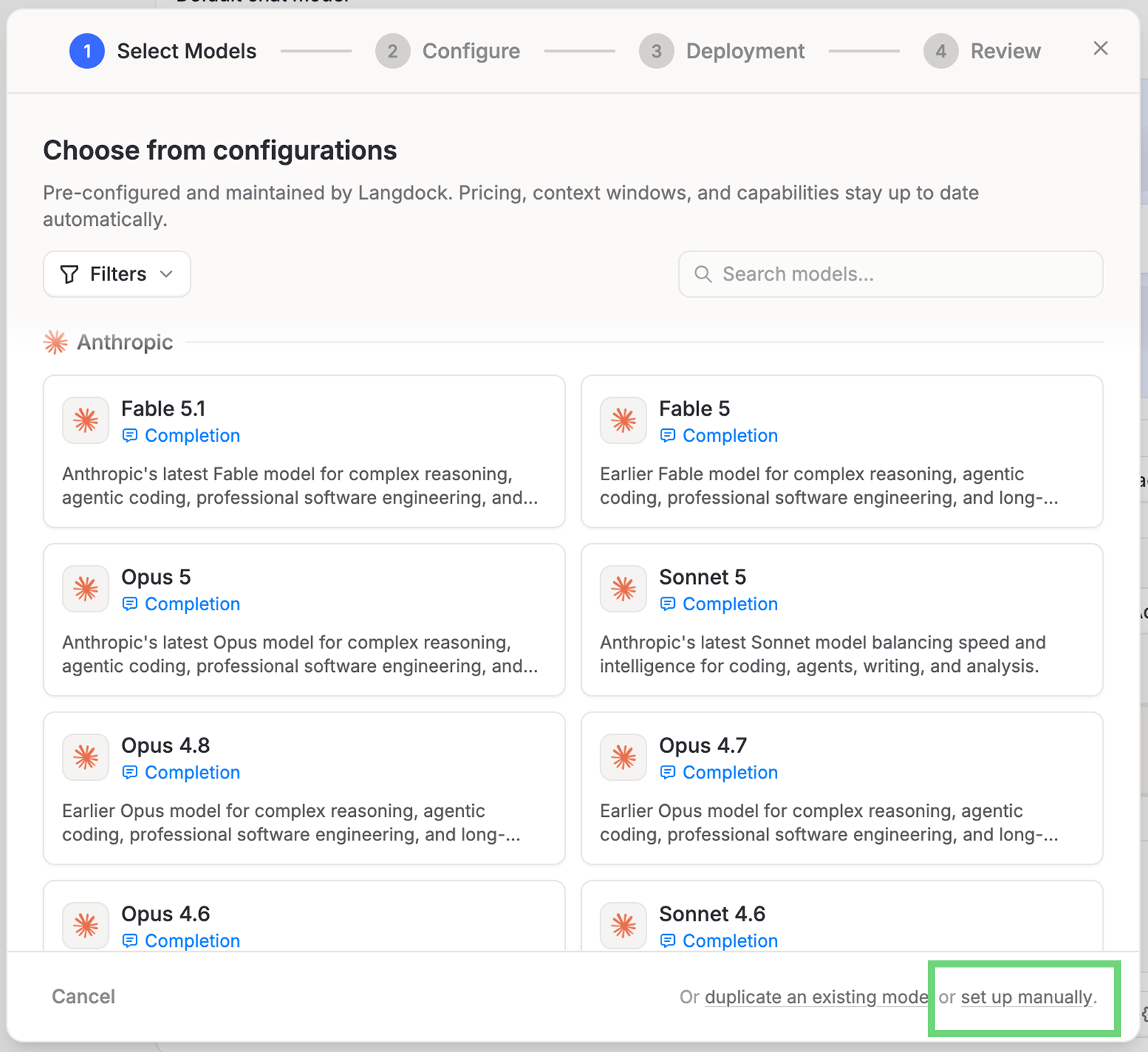
On the Configure step:
- Type: Completion
- Model Name: what users will see, for example
DeepSeek v4.1 Flash - Provider Model Name: the Requesty model ID, for example
deepseek-v4.1-flash - Provider: Other
- Region: Global, or EU if you used the EU base URL
On the Deployment step, pick the Requesty key, paste the same model ID, and click Test & continue. Langdock sends a real request through Requesty and only lets you save once it succeeds.
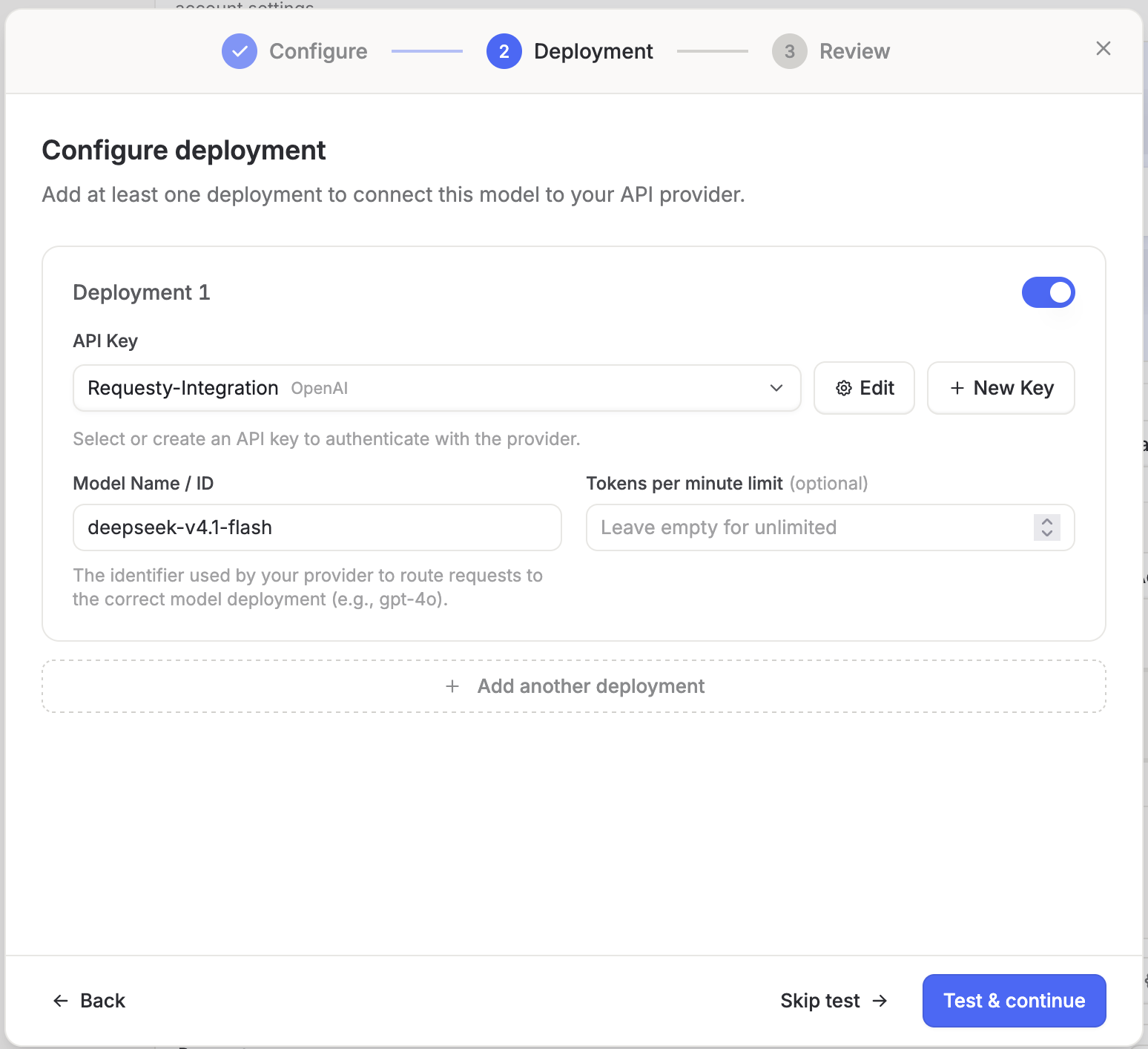
The bare name deepseek-v4.1-flash is a Requesty managed policy. Instead of pinning one provider, Requesty picks the best endpoint for that model on every request and fails over when a provider is down. If you want a specific provider, use the provider/model ID from the catalog instead, for example fireworks/deepseek-v4.1-flash.
Repeat for every model you want to expose. Each one takes about a minute because the key is already there.
Step 4: test it in chat
Open a new chat, pick the model from the selector, and ask it what it is.
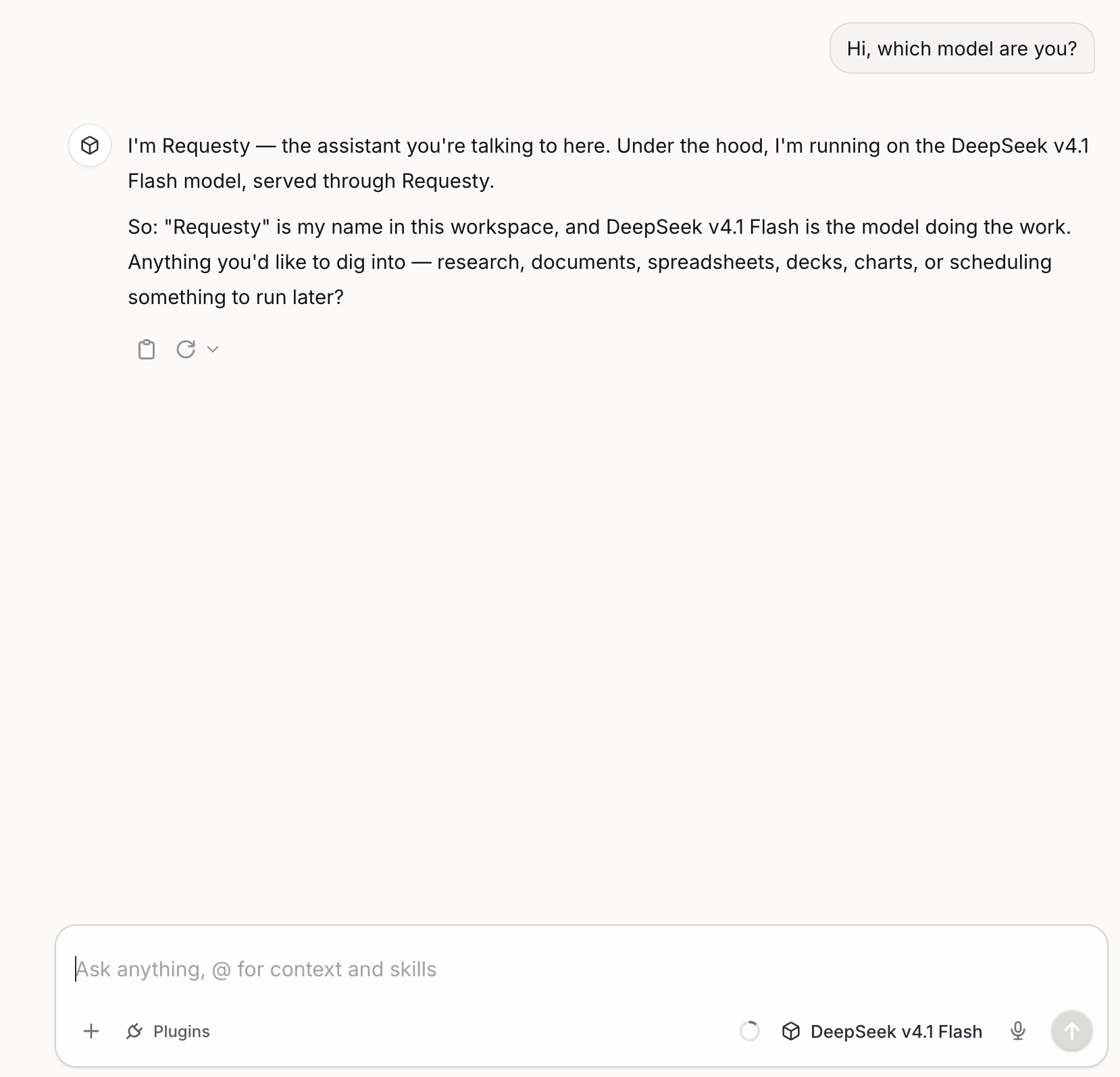
The request shows up in your Requesty logs with the provider that served it, the tokens used and the cost.
Which open source models to add first
There is no single best open-weight model, but our traffic points to a clear shortlist. These are the open-weight models with the most traffic routed through Requesty right now, ranked by token volume, with the blended price customers paid after caching:
| Model | Managed policy ID | Blended price | Good for |
|---|---|---|---|
| DeepSeek V4.1 Flash | deepseek-v4.1-flash | $0.05 / M | Everyday chat, long context, cheap agents |
| GLM-5.3 Flash | glm-5.3-flash | $0.06 / M | Vision, agentic tasks on a budget |
| DeepSeek V4 Flash 0731 | deepseek-v4-flash-0731 | $0.08 / M | Fast first token, text-only chat |
| GLM-5.3 | glm-5.3 | $0.39 / M | Coding and multi-step reasoning |
| Nemotron 3 Ultra | nemotron-3-ultra-550b-a55b | $0.03 / M | High volume at the lowest price |
| Kimi K3 | kimi-k3 | $0.63 / M | Frontier-level reasoning and agents |
The ranking comes from our public model economics data. DeepSeek V4.1 Flash went from zero to a fifth of all our traffic in under a month, so this list will change. Each ID is a managed policy, so Requesty maintains the provider chain behind it. Check the model library for the current list, prices and which providers host each model.
Keeping traffic in the EU
Most open-weight models are hosted by at least one EU provider, and several are served from Frankfurt or Paris. Two settings make the whole Langdock workspace EU-only:
- Use
https://router.eu.requesty.ai/v1as the base URL in step 2. - Use the
@euvariant of each managed policy as the model ID, for exampledeepseek-v4.1-flash@euorkimi-k3@eu, and set Region to EU on the custom model.
With the EU router and @eu policies, Requesty only considers EU-hosted endpoints for the model you chose, and requests are processed in Frankfurt. Combine that with an approved-model list that only contains EU policies and users cannot pick a non-compliant model by accident.
Tracking cost per model
Every request through the Langdock key is logged in Requesty with model, provider, tokens, cost, latency and cache status. The analytics dashboard groups spend by model and by key, so you can see whether the switch to open-weight models paid off, and which models people use. To compare against the closed models in the same workspace, see our OpenAI API pricing guide. Cache hit rates matter here: on our routed traffic, DeepSeek V4 Flash 0731 saw an 81% cache hit rate and GLM-5.3 Flash 93%, which cut bills by more than half compared to list price.
Common issues
- Test & continue fails: the model ID does not match a catalog entry, or the key is not allowed to use it. Copy the ID from the model library and check the approved-model list.
- 401 Unauthorized: the key was pasted with a trailing space or has been revoked. Edit the key in Langdock and paste it again.
- Model missing in chat: make sure Visible to users is on and the deployment toggle is enabled.
Wrapping up
Langdock gives you the workspace. Requesty gives you the models. Add one key, add the open-weight models your team wants, and you have DeepSeek, GLM, Kimi or Nemotron next to GPT and Claude in the same chat selector, with EU routing and per-model cost tracking already in place.
The full step-by-step reference with screenshots for each step lives in our Langdock integration guide.
Frequently asked questions
- Does Langdock support open source models natively?
- Not out of the box. Langdock's pre-configured model list covers OpenAI, Anthropic, Google and a few others. Open-weight models like DeepSeek, GLM, Kimi or Nemotron have to be added as custom models through an OpenAI-compatible key, which is what Requesty provides.
- Can I keep the data in the EU?
- Yes. Use https://router.eu.requesty.ai/v1 as the base URL. Requesty then only routes to EU-hosted endpoints for the model you picked, and the request never leaves the EU.
- Do I need a separate key for every provider hosting the model?
- No. One Requesty key covers every provider in the catalog. Requesty picks the endpoint, applies fallbacks if a provider is down, and bills everything on a single invoice.
- How many models do I need to add in Langdock?
- One custom model per model you want users to see. Each one reuses the same Requesty key, so adding a second or third model takes about a minute.
- APR '25
OpenWebUI vs LibreChat (2026): Which Self-Hosted ChatGPT UI Is Right for You?
OpenWebUI and LibreChat compared feature by feature: UI, authentication, RAG, deployment and model access, plus how to connect either one to 600+ models through a single API.
- MAR '25
Supercharge OpenWebUI with Requesty (An Alternative to OpenRouter)
- SEP '26
GLM-5.3 Flash vs DeepSeek V4 Flash 0731: which flash model fits your API workload?
GLM-5.3 Flash brings vision and stronger agentic scores; DeepSeek V4 Flash 0731 starts responding three times sooner. Which flash model fits your API workload?
- MAY '26
Vendor agnostic AI gateway options in 2026
A practical comparison of vendor agnostic AI gateways in 2026. What they do, how they differ, and how to pick the right one for your stack.