
AI guardrails are enforced checks outside the model that mask, block or flag content and actions. As of November 2026, they can mask sensitive input before a provider sees it, restrict which models a team may call, and check a response before it reaches a user or tool. A system prompt can state the rules; application code and gateway policies enforce them. See OWASP's Top 10 for LLM applications.
Where each guardrail runs
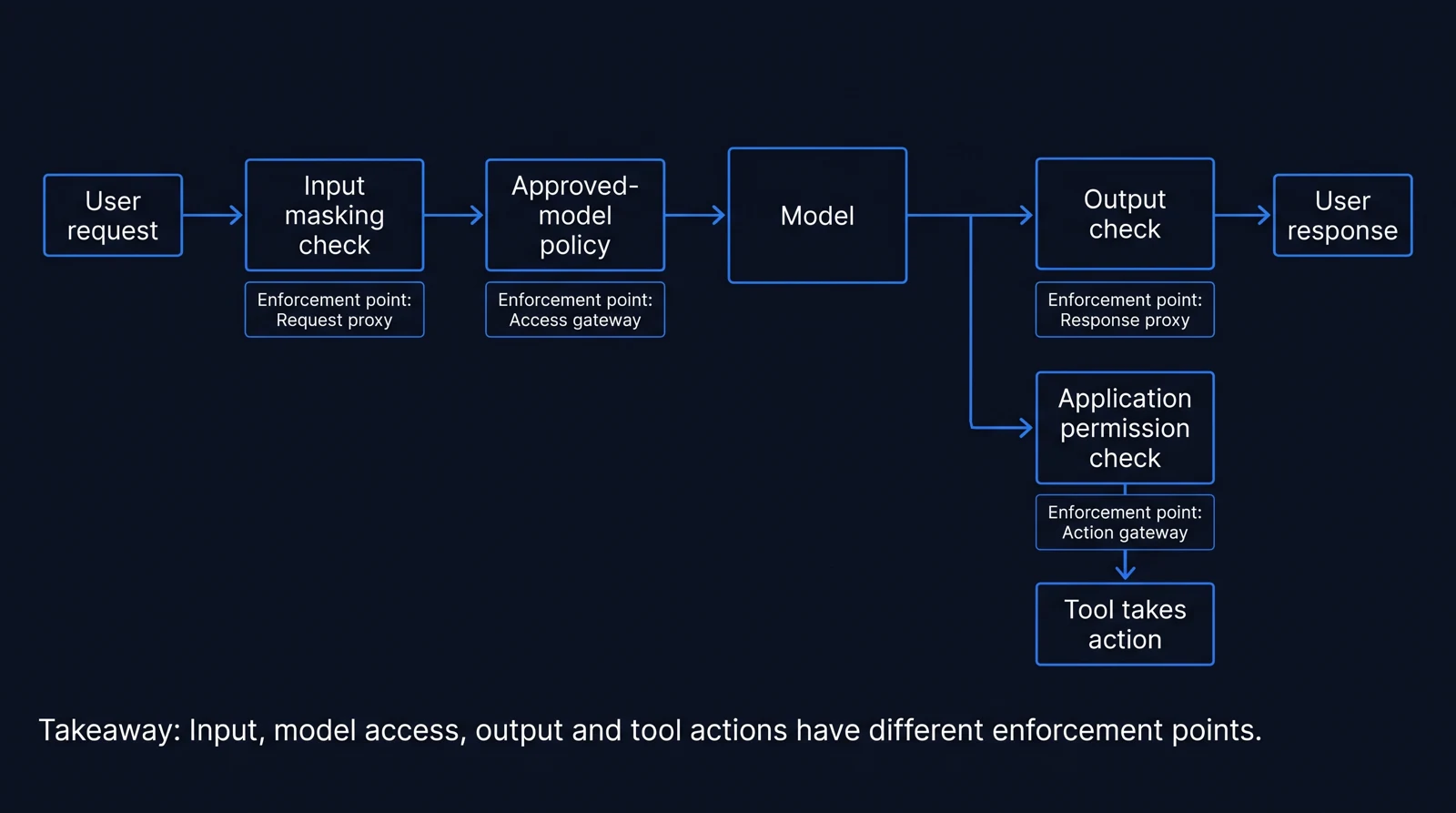
A guardrail has to sit where it can still change what happens next. Masking can remove a credit card number before the model call, and an output check can catch one in the response; neither control decides which models a team may use.
| Control | Enforcement point | Example | What it leaves for another control |
|---|---|---|---|
| Input masking | Gateway or provider service, before the model call | Replace an email address in a support prompt | Check the model's response before displaying it |
| Model policy | Gateway, before routing | Restrict a team to approved models | Check the content sent to and returned by those models |
| Output check | Gateway, provider service or application, after generation | Mask sensitive information in a response | Control what a tool is allowed to do |
| Action permission | Application code, before a tool runs | Require permission before a state-changing action | Check the content supplied to the model |
IBM's guardrails overview puts application checks alongside infrastructure controls and governance. That split helps when assigning ownership: a shared gateway can apply policies across applications, while each application keeps control of its own tools.
Mask sensitive input before the model call
Input masking replaces sensitive information it detects before the prompt goes to the model. In a support application, an email address in a customer message could be replaced while the rest of the message remains available for summarization.
Where the check runs determines what it can protect. Gateway masking happens before the request is forwarded to the provider; a provider-side check can apply its own policies, but only after the request has reached that provider's service. Our guide to PII redaction at the gateway covers the gateway approach.
Logging needs its own check. Amazon Bedrock's sensitive information documentation says model invocation logs can retain the original, unmodified request in CloudWatch regardless of guardrail intervention. Before choosing a masking point, check where the original request can be recorded.
Restrict models with an allowlist
A model allowlist permits access to a specified set of models. If teams have different approved models, the policy can reject a request outside the relevant set before the gateway routes it.
Requesty has an organization-wide Approved Models list, plus access lists for API keys and groups. Our post on routing policies for agents explains how routing policies fit into agent workloads.
The allowlist's job ends at model access. It cannot tell you whether an allowed model's answer contains sensitive data, or whether an agent should execute a tool call; those need separate checks.
Check outputs before users or tools receive them
Output checks inspect the model's response. A support application could mask a personal identifier before displaying a summary, while a content filter could block a response in a prohibited category.
The scope varies by provider. Amazon Bedrock Guardrails has content filters with configurable strength for categories including hate, sexual content, violence and prompt attacks. Cloudflare AI Gateway uses Llama Guard 3 8B to evaluate hazard categories, with settings to flag, ignore or block prompts and responses.
Tool calls need their own check. Amazon says its sensitive information filter evaluates text and does not evaluate PII generated into tool call arguments in tool-use workloads. If an application uses those arguments, it needs a check where the tool receives them.
Keep action permissions in application code
A model can ask to use a tool. The application decides whether that request may run.
OWASP's Top 10 for LLM applications treats a restrictive system prompt as a partial control. It advises keeping credentials and state-changing capabilities in application code with least privilege: give each tool only the access it needs, and check the requested action before execution.
Prompt attack detection covers a different part of the path. Cloudflare documents a prompt injection category evaluated by a prompt guard model. Detection can filter an input; application permissions still decide what an agent can do if it reaches a tool.
What a guardrail can add to response time
Cloudflare says Llama Guard 3 8B evaluations on Workers AI typically add about 500 milliseconds per request. That figure is useful for planning, with one caveat: it describes Cloudflare's evaluation, not every guardrail.
Take a support application whose response time is 2 seconds. If one Cloudflare evaluation adds 500 milliseconds to the request path, the response takes 2.5 seconds, a 25% increase. Starting from 5 seconds instead, the same added 0.5 seconds would be a 10% increase.
Your own checks may take longer or shorter, so measure the full request path with the checks enabled, including any output validation that runs before the user sees the answer.
Start with the paths your applications use
A shared gateway can set model access policies and apply PII masking across the applications that route through it. Requesty has both, through guardrails and approved models, along with budget caps and per-user spend limits. Our enterprise AI gateway guide covers the gateway's role in a wider deployment.
Run this checklist for each application before turning on a policy:
AI guardrails checklist
0 of 7 done
Start with one application. Trace a request from the caller to the model and back to the user or tool, assign an owner to each enforcement point, and then extend the same controls to other applications.
Frequently asked questions
- What are AI guardrails?
- AI guardrails are enforced checks outside an AI model that mask, block or flag content and actions. They can run on inputs, model access, outputs and application actions.
- What are examples of AI guardrails?
- Examples include masking personal information before a prompt reaches a model, restricting a team to approved models, and checking a response for sensitive information before showing it to a user.
- Where should AI guardrails be enforced?
- A gateway can apply shared input masking and model access policies. Provider services can add content checks, while application code can validate outputs and enforce permissions before an AI agent uses a tool.
- Do AI guardrails prevent prompt injection?
- Prompt attack detection can flag or block some attacks, but a system prompt alone is a partial control. Application code should hold credentials and enforce least privilege for actions that change data.
- Does PII masking cover AI tool calls and logs?
- Coverage depends on the product and configuration. Amazon Bedrock says its sensitive information filter does not evaluate PII generated into tool call arguments, and model invocation logs can retain original requests.
- How much latency do AI guardrails add?
- Latency depends on the check. Cloudflare says Llama Guard 3 8B evaluations on Workers AI typically add about 500 milliseconds per request.
- OCT '26
LLM PII Redaction and Guardrails: Tools Compared in 2026
Compare LLM PII redaction tools and guardrails for masking, prompt injection and output checks, with deployment choices and a rollout checklist.
- JAN '26
Routing policies 101: fallback, load balancing, and latency in production
The three routing-policy primitives every LLM gateway needs (fallback chains, weighted load balancing, and latency-based selection) and when to use each. Written for teams deploying multi-model production setups.
- OCT '26
Enterprise AI Gateway Comparison: SSO, RBAC and Audit Logs (2026)
Compare enterprise AI gateway options for SSO, RBAC, audit logs, approved models and residency, with a downloadable buyer evaluation checklist.